Home / Blog / Modifying Tax Rates
Docs • Aug 2025

Modifying Tax Rates

  To Modify Tax Rates 1. Mouse-Over on Admin Menu 2. On the drop down Select Tax Systems 3. The right hand pop up menu lists all the existing Tax System  - presently there is only&n

K. Romeo
~1 min read
Modifying Tax Rates
Article
Share Post


To Modify Tax Rates

1. Mouse-Over on Admin Menu

2. On the drop down Select Tax Systems

3. The right hand pop up menu lists all the existing Tax System  - presently there is only Indian VAT System

4. Select the listed Tax System - India VAT System

5. The next window lists all the Tax Systems, their Categories, Names and the modules which make use of these
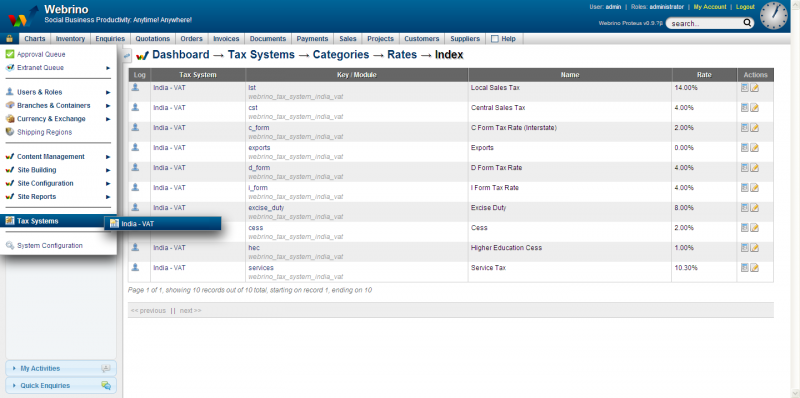


6. The extreme right Actions column has two action icons - View and Edit

7. Click on Edit

8. The next editable window has an option of editing : Key, Name and the Tax Rate

9. Make the changes

10. Click Submit


About the author
K. Romeo writes practical ERP and operational workflow guides for SMEs in trading, retail, and multi-branch businesses. The focus is always the same: reduce manual work, increase visibility, and protect margin.